

Image Upscaler
High resolution image Upscaler and Enhancer.
Input
Upload Image
View upload limits
Image: JPG / PNG / WEBP, ≤10.0MB, up to 1 images, width & height ≥300px, aspect ratio 1:2.5 ~ 2.5:1
Prompt
Negative Prompt
Scale Factor
Dynamic
Creativity
Resemblance
Sharpen
Quality Level
Hand Fix
Pattern
Output Format
Result
View History| Model & Modality | Credits / Gen | Our Price (USD) | Official Price (USD) | DISCOUNT |
|---|---|---|---|---|
image-upscaler imageCrun | 4 per image | $0.0179 | $0.021 | - 15% |
Supercharge Your Images with One Click
Stop squinting at blurry edges and low-res noise. Our AI Image Upscaler intelligently reconstructs your photos, adding stunning clarity and sharpness where it matters most. From intricate textures to fine lines, experience professional-grade upscaling that looks completely natural.
Crun AI Image Upscaler vs Traditional Image Enhancement
See how Crun AI Image Upscaler delivers sharper, clearer images compared to traditional enhancement methods.
| Feature | Traditional Image Enhancement | Crun AI Image Upscaler | Advantage |
|---|---|---|---|
Upscale Factor | Usually ≤2× | 2×~10× | AI supports higher upscaling while keeping images sharp |
Detail Preservation | Edges may blur, textures lost | High fidelity, details retained | Keeps original textures, fine details remain intact |
Style Fidelity | Colors may shift, over-sharpened | Natural colors, faithful to original | Maintains original style, enhanced naturally |
Noise Control | May amplify noise when enhancing | Smart denoising while enhancing | AI distinguishes noise from texture for clean results |
Ease of Use | Requires complex software & settings | Simple upload and enhance | Online AI, no manual adjustments needed |
Use Cases | Basic photo enhancement | Portraits, anime, illustrations, landscapes | Broadly applicable, results look natural and refined |
Intelligent Pixel Reconstruction, Not Just Resizing
Conventional scaling forces pixels to stretch, resulting in the dreaded "blur" and "pixelation." Our AI takes a different approach. Using deep learning models trained on millions of high-resolution images, it "understands" the content of your photo. It doesn't just make pixels bigger—it intelligently predicts and fills in missing details, generating sharp edges and realistic textures that weren't visible in the original file.
Achieve 4K Clarity While Preserving Natural Textures
The biggest challenge in AI upscaling is avoiding that "over-processed" or "plastic" look. Our algorithm is fine-tuned to maintain the perfect balance between sharpness and authenticity. Whether it’s the subtle grain of a portrait, the intricate fabric of a product shot, or the complex geometry of an architectural photo, our tool preserves the original soul of your image while elevating it to professional 4K resolution.
Seamless Integration into Your Creative Workflow
High-quality visuals are the backbone of any successful project, but small source files are often a bottleneck. Our AI Image Upscaler removes these limits, allowing you to prepare web graphics for large-format printing or turn social media snapshots into high-end marketing assets instantly. Skip the complex manual retouching in Photoshop and get production-ready results in seconds, so you can focus on what really matters: your creativity.
Tailored for Creators Who Refuse to Compromise on Quality
High-resolution visuals shouldn't be a luxury. Whether you are building a brand, preserving history, or designing the future, our AI Image Upscaler adapts to your specific needs, delivering precision where it matters most.
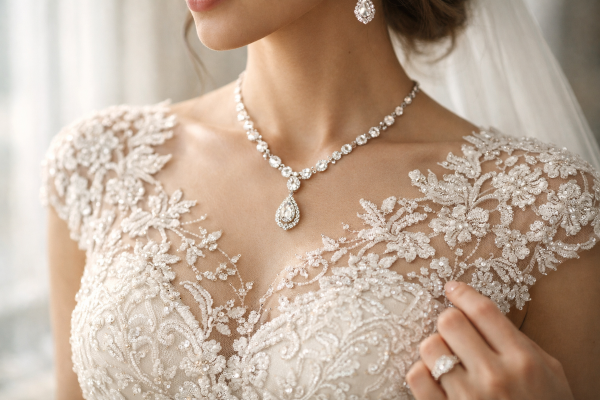
Gallery-Grade Detail in Every Shot
Don't let low resolution limit your portfolio. Restore fine details and eliminate noise to turn candid snapshots into professional, large-format prints.
Everything You Need to Know About AI Image Upscaling
How does AI upscaling differ from regular image resizing?
Traditional resizing tools simply "stretch" existing pixels, which creates a blurry, pixelated mess. Our AI Upscaler uses a trained neural network to analyze the content of your photo and literally "guesses" what the missing pixels should look like. It adds new information to the image, resulting in a crisp, high-definition finish that looks like it was originally captured at a higher resolution.Will my upscaled images look "fake" or "plastic"?
Not at all. We’ve tuned our algorithm to avoid the aggressive "smoothing" effect common in lower-end AI tools. Our goal is to preserve authentic textures—like skin pores, fabric weaves, and natural grain—while enhancing clarity. Your photos will look sharper, but they will still look like your photos.What types of images work best with this tool?
Our AI is versatile. It excels at improving product photography, portraits, digital art, and even scanned old family photos. It’s particularly effective for cleaning up low-res web assets or prepping small photos for high-quality printing.Is my privacy protected when I upload photos?
Absolutely. We take data security seriously. Your uploaded images are processed through an encrypted connection and are automatically deleted from our servers shortly after the upscaling process is complete. Your files are never used to train our public models without your explicit consent.Can I upscale an image to 4K or higher?
Yes. Depending on the original file size, you can upscale your images by 2x or 4x, easily reaching 4K resolution and beyond. This makes your visual assets perfect for large-format displays, high-end presentations, and professional print materials.
