


Watermark Remover
Upload an image or video, and the AI watermark remover will professionally and seamlessly remove watermark content for you.
Input
Result
View HistoryWatermark Remover
| Model & Modality | Credits / Gen | Our Price (USD) | Official Price (USD) | DISCOUNT |
|---|---|---|---|---|
video-watermark-remove videoCrun | 0.5 per second | $0.0022 | N/A | N/A |
| Model & Modality | Credits / Gen | Our Price (USD) | Official Price (USD) | DISCOUNT |
|---|---|---|---|---|
image-watermark-remove imageCrun | 6 per image | $0.0268 | N/A | N/A |
AI Watermark Remover — Remove Watermarks from Photos & Videos in Seconds
Upload your image or video, let AI handle the rest, and get a clean result fast. Simple, smooth, and built for everyday editing.
Use Cases
Whether you work with visual content every day or only need a quick fix once in a while, this tool is designed to save time and keep your workflow simple.

Editing images or videos for social media, YouTube, or personal content
Remove watermarks before publishing to keep your visuals clean, focused, and more professional. It helps your content look polished without spending extra time on manual editing.
Image Watermark Removal
Remove unwanted watermarks from photos while keeping the image looking natural and polished.
Video Watermark Removal
Clean up video frames with AI-based processing that helps restore a smoother, distraction-free look.
Fast, Easy, No Learning Curve
No complicated tools, no time-consuming edits. Just upload, process, and download.
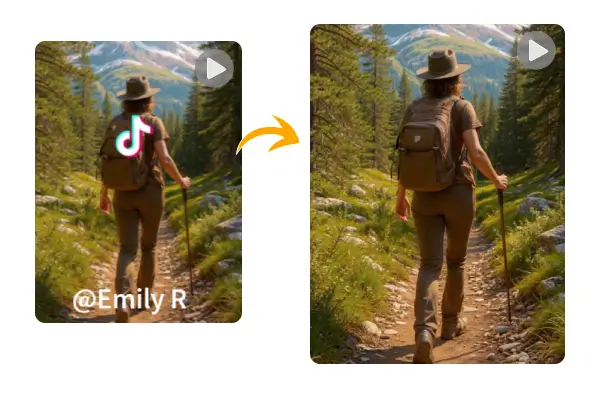
AI vs Manual Watermark Removal
AI tools are designed for speed and convenience, making them ideal for everyday use and bulk processing. Manual editing, on the other hand, offers more control and precision, especially for complex backgrounds or detailed corrections.
| Aspect | AI Removal | Manual Editing | Recommendation |
|---|---|---|---|
Speed | Seconds to minutes | Much slower | Choose AI for quick tasks |
Ease of Use | Very simple, no skills needed | Requires experience | Beginners should use AI |
Cost | Usually lower | Higher (time or money) | AI is better for bulk work |
Precision | Good for most cases | Better for complex edits | Use manual for tricky details |
Frequently Asked Questions About AI Watermark Remover
What is an AI watermark remover?
An AI watermark remover uses machine learning to detect and remove watermarks from images or videos, then intelligently fills in the missing area so the result looks natural.Will removing a watermark affect quality?
In most cases, the quality remains good. However, results depend on how complex the watermark and background are.How long does it take to remove a watermark?
Usually just a few seconds for images and a bit longer for videos, depending on file size.Is this tool safe to use?
Yes, your files are only used for processing and are not manually reviewed.Do I need to install anything?
No installation needed. Everything works directly in your browser.
